我有一个 C# MVC View ,它取决于传递的模型数据 - 数字表 - 需要 View 设置 View 开始呈现数据的阈值,即
@for (var value = ["threshold"]; value <= 5; value++){
    ...
}
我目前的想法是,处理此问题的最佳方法是使用 html select 来更改 session 变量:
<select id="thresholdSelect">
    <option value="1">1</option>
    <option value="2">2</option>
    <option value="3">3</option>
    <option value="4">4</option>
    <option value="5">5</option>
</select>
不幸的是,我对 C# MVC 的了解意味着我不知道如何以这种方式设置 session 变量,而且我对 DropDownListFor 的细读让我感到困惑。
这似乎过于复杂,因为要求硬编码值仅限于单个页面,这意味着我希望理想的答案是在 View 中触发选择元素的更改事件的几行。相比之下,DropDownListFor 的示例显示它在相关 Controller 和模型周围跳动并从数据库中获取存储的数据,这对我需要的东西来说太过分了。
我该怎么做?我一直在 Controller 级别设置 session 变量,但现在需要在 View 级别设置 session 变量。
我需要实现的基本步骤是:
- 如果未设置,则显示带有默认 session 变量的页面(在返回 View 之前在 Controller 中轻松完成)
- 显示一个带有阈值的选择元素(很容易完成,因为我已经输入了代码 在问题中)
- 当 select 元素发生变化时,触发将 session 变量设置为所选值的事件。
请您参考如下方法:
MVC 不一定具有 Web 表单意义上的“事件”(尽管您可以使用它们),但通常不建议这样做。 MVC 对应于从服务器发送/接收数据的 HTTP 模型。当您想要与服务器交互时,您需要在 Controller 类上使用额外的操作方法。
您的 Controller 可以通过多种方式接受来自客户端的输入,但其中最基本的方式是为您的操作方法指定参数,MVC 将尝试将这些参数绑定(bind)到请求数据(表单、查询字符串等)。这是一个示例 Controller :
//Controller class
public class ReportController : Controller {

    public ActionResult Index() {
        ActionResult result = null;
        ReportSelectionViewModel viewModel = this.BuildViewModel();

        result = View("Index", viewModel);
        return result;
    } // end action Index

    [HttpPost()]
    public ActionResult ChangeReport(ChangeReportRequest changeRequest) {
        ActionResult result = null;
        ReportSelectionViewModel viewModel = this.BuildViewModel();

        Session["ReportOptions"] = changeRequest;
        viewModel.Messages.Add("Selection was changed.");
        viewModel.ReportRequest = changeRequest;

        result = View("Index", viewModel);

        return result;
    } // end action ChangeReport

    //Method that encapsulates the logic needed to build a view model for actions on this controller
    protected ReportSelectionViewModel BuildViewModel() {
        ReportSelectionViewModel viewModel = null;
        viewModel = new ReportSelectionViewModel();
        viewModel.AvailableThresholds.AddRange(new int[] { 1, 2, 3, 4 });
        //Set the value to whatever the user previously selected if available
        if (Session["ReportOptions"] != null) {
            viewModel.ReportRequest.ThresholdSelect = ((ChangeReportRequest)Session["ReportOptions"]).ThresholdSelect;
        } // end if
        return viewModel;
    } // end function BuildViewModel

} // end class ReportController
在上面的 Controller 中,默认的 Index() 操作不接受任何参数,因为第一次访问不需要任何参数。 ChangeReport() 操作接受称为模型的 ChangeReportRequest 类型的参数。这告诉 MVC 此操作期望来自客户端的一个值(或一系列值),并导致 MVC 更深入地挖掘以找出客户端提供哪些值来满足 Controller 的参数参数并返回一个完全填充的模型对象。
这是模型类的样子:
//Model class that gets built by the DefaultModelBinder
public class ChangeReportRequest {

    private int _reportId;
    private int _thresholdSelect;

    public ChangeReportRequest() {
        _reportId = 1; // Meaningful default value here
        _thresholdSelect = 0;
    } // end constructor

    public int ReportId {
        get {
            return _reportId;
        } set {
            _reportId = value;
        }
    } // end property ReportId

    public int ThresholdSelect {
        get {
            return _thresholdSelect;
        } set {
            _thresholdSelect = value;
        }
    } // end property ThresholdSelect

} // end class ChangeReportRequest
拥有一种专门用于显示目的的不同类型的模型(ViewModel)也是一个好主意(它不同于用于保存事务数据的普通模型)。 ViewModels 在您的 View 中添加编译时支持,以便在 View 中显示内容。示例 ViewModel 如下所示:
//Strongly typed view model class passed to the view to add intellisense support in the view and avoid the ViewBag.
using System.Collections.Generic;
public class ReportSelectionViewModel {

    private List<int> _availableThresholds;
    private List<string> _messages;
    private ChangeReportRequest _reportRequest;

    public ReportSelectionViewModel() {
        _availableThresholds = new List<int>();
        _messages = new List<string>();
        _reportRequest = new ChangeReportRequest();
    } // end constructor


    public List<int> AvailableThresholds {
        get {
            return _availableThresholds;
        }
    } // end property AvailableThresholds

    public List<string> Messages {
        get {
            return _messages;
        }
    } // end property Messages

    public ChangeReportRequest ReportRequest {
        get {
            return _reportRequest;
        } set {
            if (value != null) {
                _reportRequest = value;
            } // end if
        }
    } // end property ReportRequest

} // end class ReportSelectionViewModel
MVC 具有内置的模型绑定(bind),它将尝试将表单字段映射到 Controller 操作方法上的输入值。通过将 Controller 方法参数命名为与您的选择列表相同的名称(您必须为您的选择列表指定一个名称以及它的 ID),您可以简单地在您的选择列表周围创建一个表单包装器:
下面是将与上述代码一起使用的 View :
@model ReportSelectionViewModel

<h2>Index</h2>
<div class="message-wrapper">
    <ul class="messages">
    @foreach(string message in Model.Messages) {
        <li>@message</li>
    }
    </ul>
</div>
<form method="post" action="@Url.Action("ChangeReport")">
    <select id="ThresholdSelect" name="ThresholdSelect">
    @foreach(int item in Model.AvailableThresholds) {
        <option value="@item" @(Model.ReportRequest.ThresholdSelect == item ? "selected" : "")>@item</option>
    }
    </select>
    <!--Later this can be made into a text box or drop down or whatever, as long as the name matches the model-->
    <input type="hidden" name="ReportId" value="@Model.ReportRequest.ReportId" />
    <input id="submit" type="submit" name="submit" value="Select" />
</form>
默认的 MVC ModelBinder 是智能的。它通过 ModelMetaDataProvider 使用反射来迭代您方法中的参数,并尝试从 HTTP 请求中找到根据名称匹配的字段(这就是为什么命名表单字段很重要的原因)。它也可以做比 int 或 string 更复杂的事情。
这里有一些资源:
- http://msdn.microsoft.com/en-us/library/dd410269(VS.98).aspx <-- 操作方法详细信息
- ASP.NET MVC: Order of execution of ValueProviders
- http://msdn.microsoft.com/en-us/library/system.web.mvc.urlhelper.action(v=vs.118).aspx <-- UrlHelper.Action 方法文档
- http://msdn.microsoft.com/en-us/magazine/hh781022.aspx <-- 深入了解模型绑定(bind)
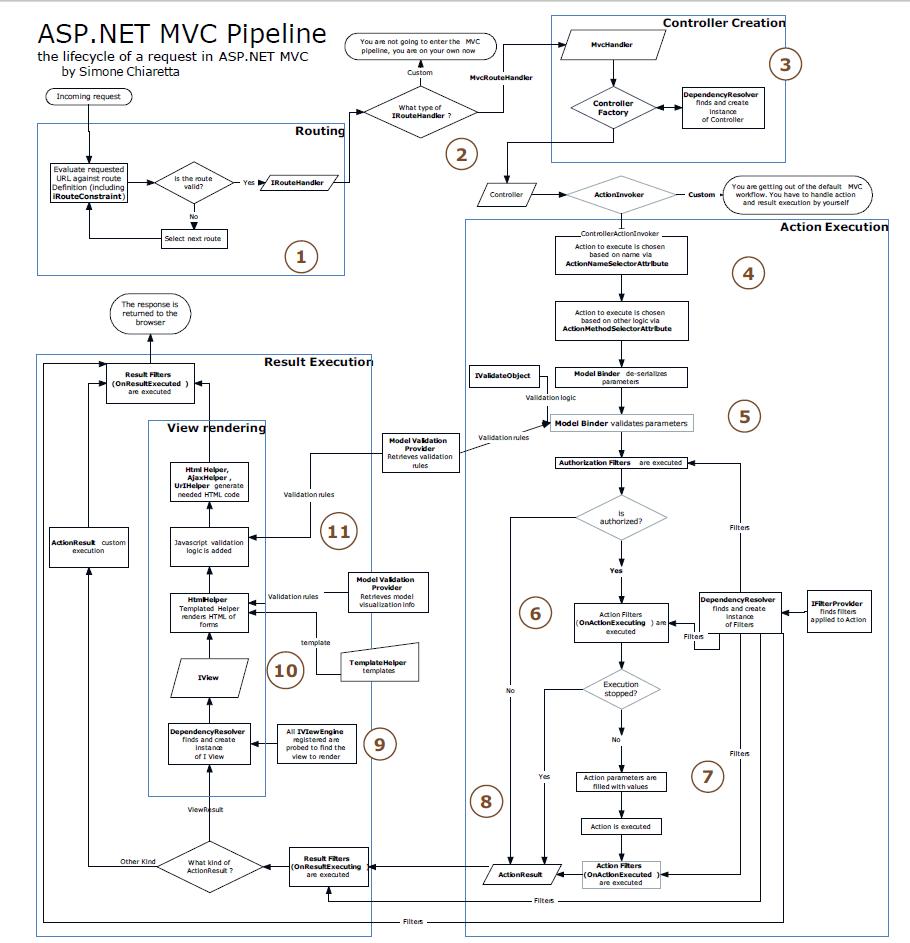
- http://4.bp.blogspot.com/-Gau0xCLzHNI/UP_09kyYRII/AAAAAAAAAdo/PIcORsboCj4/s1600/MVCPipelineDetailed-770334.JPG <-- MVC 管道